CS2 Tick Rate Command Explained: How to Get It
Contents

Few players seem to pay much attention to tick rate in CS2, despite it being a major topic in CS:GO. While tick rate is still part of Counter-Strike 2, Valve’s sub-tick system is doing all the heavy lifting now, making the old 64 Hz vs. 128 Hz discussion way less relevant.
CS2 servers use the 64-tick rate with Valve’s subtick technology. In practice, this combination gives you better results compared to the old 128-tick-rate servers, which is why you can no longer find them on FACEIT or official esports tournaments.
Still unsure about the CS2 tick rate or the differences between the game versions? Keep reading to find out more.
What Is Tick Rate in CS2?
Just like the official Valve servers in CS:GO, the latest Counter-Strike version also runs on servers with a 64 Hz tick rate. It means that all the in-game actions, such as movement, shooting, and object interactions, are synchronized between the server and players’ PCs 64 times per second. This leaves a gap of 15.625 milliseconds between updates, which is a significant amount of time in a game as fast and reaction-based as CS2.
Why Was the 64/128 Tick Rate Difference Important in CS:GO?

In CS:GO, a 64-tick rate sometimes resulted in shots not being registered by the server, missed bullets, and movement fails if those actions were initiated between the ticks. It did not happen often and most of us didn’t even notice it, but for professional and high-skill players the difference between the 64-tick-rate servers and 128-tick servers were quite pronounced. The latter sent twice as many updates between the server and the player’s PC, making gameplay feel smoother and more responsive.
That’s why pro players preferred FACEIT or ESEA servers, as these platforms offered a 128-tick rate. For a long time, this was one of their biggest advantages. However, that advantage was eliminated in CS2 with the introduction of the subtick system.
Subtick vs Tick Rate
As we’ve already mentioned, all CS2 servers tick rate is 64 Hz, but Valve uses its subtick system to compensate. Instead of simply upgrading thousands of servers, Valve tackled the issue by redesigning how player actions are registered.
Now, the server tick rate is mainly responsible for sending general game info, and 64 ticks per second is more than enough for that. However, every player movement, shot, or thrown grenade gets its own precise timestamp. This timestamp is not connected to any tick and operates as an additional layer of input data. As a result, every click or action in CS2 is evaluated and verified separately by the server, which is quite unlike the old tick-based processing.
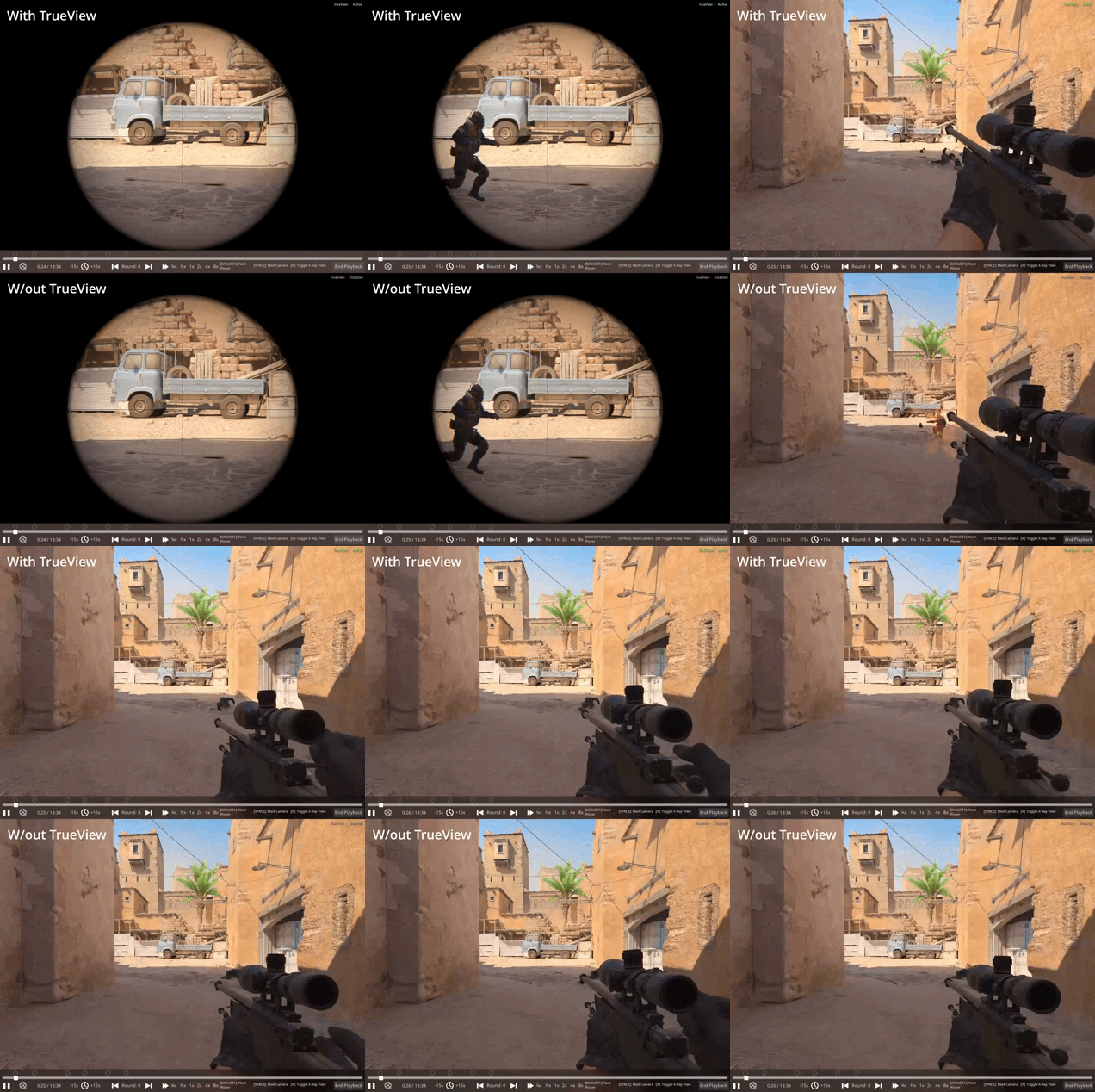
In practice, it allows the game to register every action on the server with greater precision than what 128-tick-rate servers had to offer. That said, some visual lag is still present, and that’s why Valve released the TrueView update in November 2025. This update makes it possible to see how an action looked from the player’s perspective, since the server can now recreate situations while accounting for input and network delays that previously made certain bits of gameplay look weird or unnatural.
What Are the Pros & Cons of 64 Ticks?
The default CS2 server tick rate is now 64. All servers available via Valve’s official competitive matchmaking will use this value, and you cannot change it. Nevertheless, a lower tick rate also has its advantages:
Pros
- Reduces the server and client load, improving performance.
- Allows more players to be connected to the server.
Cons
- Gameplay can feel rough and less responsive.
- Degrades the accuracy of player positioning and the behavior of game objects.
What Are the Pros & Cons of 128 Ticks?
With the server tick rate in CS2 being locked at 64, it looks like there's no need to dedicate any time to discussing 128 Hz options. Still, theoretically, Valve can update the game processing and combine 128 servers with a subtick system, allowing the two technologies to complement each other. Let’s review the benefits and drawbacks of this theoretical merger:
Pros
- Could make gameplay feel more smooth and responsive.
- Could improve the visual side of the game, since the current subtick system focuses on fair input registration rather than perfect visual representation.
- Could reduce the pressure on subtick measurement systems, potentially creating a more balanced resource load across the GPU, CPU, and RAM.
Cons
- Would require more server and client resources, which can degrade performance for players with low-end PCs.
- Could reduce the number of players a server can handle simultaneously.
- Would force Valve to change or update their 64-tick rate servers.

How Do I Get 128 Ticks in CS2 Through Steam?
You cannot play CS2 on 128-tick servers, as Valve has updated all official servers to run a 64-tick system with subtick technology. Because of this, there is no Steam launch option, Properties setting, or CS2 tick rate command that can enable 128 tick the way it was possible in CS:GO.
How Do You Increase a Tick Rate to 128 in CS2?
While this was a common request in CS:GO, it is no longer possible in CS2. Neither console commands nor specific providers can bring you a 128-tick server, and there is no practical need for it.
CS2 128 Tick Rate Command
While there is no console command that enables 128 tick in CS2, many websites still suggest checking the tick rate of the server you are playing on. One widespread mistake is using the following command:
cl_showfps 3
While this command displays some server-related information on your screen, it does not show the server tick rate.

How to Find a Server with a 128 Tick Rate
You cannot find a real 128-tick server in CS2 right now. If someone claims to offer one, they are either mistaken or deliberately misleading players. In the past, platforms like ESEA and FACEIT offered 128-tick servers and presented them as one of their key benefits. Now, you won’t find anything related to the tick rate on either platform, as they have since shifted their attention to other features.

Conclusion
We hope this article has CS2 tick rate explained for you. With the release of CS2, Valve added the subtick system, which balances the drawbacks of the 64 Hz servers and essentially eliminates any need for 128-tick systems. There was plenty of discussion about this change when CS2 first launched, but by now it’s more than proven that the system works well enough.
FAQ
The maximum tick rate in CS2 is 64 Hz. CS2 uses the subtick system to make action registration more accurate and consistent. In many cases, this system can feel fairer than traditional 128-tick servers.
Many players expected CS2 to transition to 128-tick rate servers, but Valve took a different approach. Instead of increasing the tick rate, the company introduced the subtick system, which changed how in-game actions are processed and made 64 Hz servers even more accurate than they were with the 128 ticks. As a result, a higher tick rate would offer no major benefits beyond minor improvements to smoothness and visual consistency.
There is no tick rate command in CS2, since all servers run at 64 Hz. Many console commands you can find on the internet won’t show you the tick rate of the server, although they can still give you useful server information.