Top KZ Maps in CS2 for Climb & Jump Practice

KZ (short for Kreedz Climbing) is one of the most specific community modes in Counter-Strike. It dates back to the CS 1.6 era, but even today, CS2 movement maps serve as a showcase of the player's skills, which can sometimes be just as important as aiming.
Whether you’re training strafes, air acceleration, or simply enjoying a skill-based challenge, CS2 KZ maps are the ultimate form of movement training in CS2 that can sharpen your reflexes. In this guide, we’ll explain what KZ climbing maps are, how to play them, and list the best ones with Workshop codes for every skill level.

What Are KZ Maps in CS2?
If you are new to these maps, check out our KZ in CS2 explained guide to understand the basics of Kreedz climbing and how it differs from other movement modes.
The best KZ maps in CS2 are designed to test your movement, jumping, and timing precision. Players must reach the finish zone as quickly as possible by hopping, climbing, and strafing across complex obstacles without falling.
These climb maps trace their roots back to CS 1.6 and CS:GO, where movement enthusiasts created hundreds of training locations for skill development. In CS2, the KZ community has revived this legacy with upgraded lighting, smoother physics, and even leaderboard tracking.
KZ vs. Surf vs. Bhop Maps
When exploring a CS2 parkour server, new players may find it difficult to understand the difference between surfing, bunnyhoping, and climbing or jumping modes. In Counter-Strike, there are three main types of movement maps, each with distinct mechanics:
Mode | Movement Specifics | Map Example |
KZ (Kreedz Climbing) | Climbing and jumping, including air strafes, crouch-jumps, and beating timings |
|
Surf | Sliding on ramps, maintaining smooth angles, and overall coordination |
|
Bhop (Bunnyhop) | Continuous jumping involving air strafing and perfect timing |
|
Understanding the difference between surf vs KZ in CS2 helps beginners choose which mode to train first. While Surf focuses on momentum and flow, it’s rarely useful in competitive matches. KZ, however, improves timing and jump consistency, both essential in 5x5 battles.
To build a complete movement training routine, also check out a guide on the best parkour maps for movement practice beyond just KZ challenges.
Where to Find Kreedz Climbing Maps
If you’re unsure how to play KZ in CS2, here’s a short step-by-step guide, which is traditionally linked to visiting the Workshop:
Launch Counter-Strike 2, choose “Play” and go to the Workshop tab.
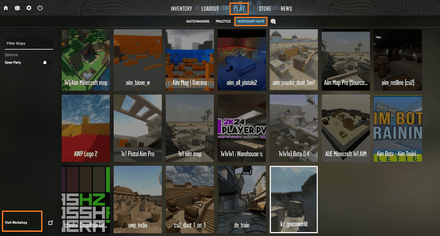
Type
kz,climb, orparkourin the search bar.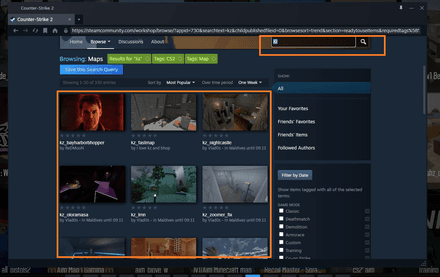
Click Subscribe to begin your KZ workshop download and add the map to your list.
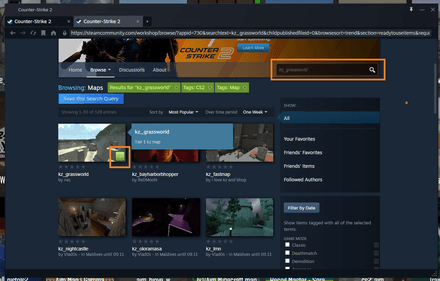
- Return to your Workshop maps in-game and launch it.


In the Workshop, you can view map codes, which are unique for every battlefield, helping players avoid confusion between different destinations. Some maps, such as “Refrag.gg Aim training,” also serve as versatile tools that combine both aim practice and bunnyhop or KZ modes.


If you want to pair your movement practice with aiming skills, consider our list of crosshair training maps to improve precision.
Best KZ Maps in CS2 [Workshop Links & Descriptions]
Below is a curated list of the most popular KZ climbing maps in CS2, ranked by design quality, difficulty, and player feedback. These community favorites suit both newcomers and advanced players who want to push their movement skills to the limit.
Map | Workshop Link | Difficulty | Description |
| Easy | A classic beginner map with smooth jumps, wide platforms, and a scenic Aztec jungle theme. Great for learning strafes and jump timing. | |
| Easy | Often called the entry to the KZ world. While some jumps still require practice, it's Japanese-inspired design makes it visually appealing. | |
| Easy/Medium | A short, enjoyable KZ map perfect for KZ beginners in CS2. Excellent layout to warm up movement skills before a match. | |
| Medium | A chess-themed remake of the CS:GO classic. Many jumps require side-strafing and precise crouch timing. | |
| Medium | Anime lovers will appreciate this map’s creative design. It’s a true jumping marathon that leaves no room for mistakes. | |
| Medium | Here, the main theme is a forgotten island, with medieval abandoned fortresses as the central objects. The relaxing ocean sounds make it both challenging and calming. | |
| Medium/Hard | Natural mountain cliffs with long jumps and tricky ledges. It combines KZ and bhop mechanics, making it an ideal choice for KZ bhop practice. | |
| Hard | A minimalist sandy design that focuses purely on jump accuracy. Among the toughest KZ pro maps in CS2. |
All of these maps are available for free in the Workshop, allowing you to practice offline or on community climb servers. Online “climb servers” also include timers, leaderboards, and checkpoints, letting you compete in KZ time trials in CS2 against players worldwide. Even beginner maps can turn into fierce competitions. Be attentive when selecting CS2 KZ workshop codes, as some of them may lead to the older map versions. Always choose the ones optimized for the latest CS2 update.
How to Play KZ Maps in CS2 (Setup Guide)
If you’re new to custom maps, setting up a CS2 KZ practice session takes just a few minutes.
Enable Developer Console
- Go to Settings → Game → Enable Developer Console (Yes).
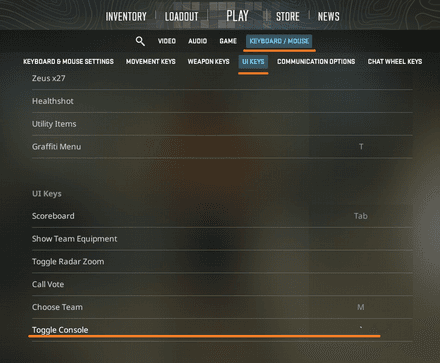
- Subscribe to the best KZ map list CS2 Workshop offers by visiting Steam’s responsive page. Click the green Subscribe button to add your chosen map (explained above).
Choose the map and launch it from the Workshop Maps tab in the Play menu.
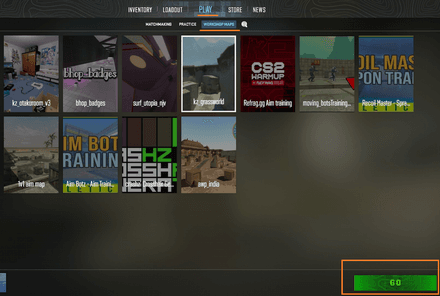
Adjust Server Commands. Since some maps or servers don’t load properly, use this basic set of console commands:
sv_cheats 1;buddha 1;mp_freezetime 0;mp_team_intro_time 0;mp_warmup_end;mp_roundtime_defuse 9999;mp_roundtime_hostage 9999;sv_gravity 800;mp_restartgame 1.
Join Climb Servers (Optional)
Open the Community Server Browser.
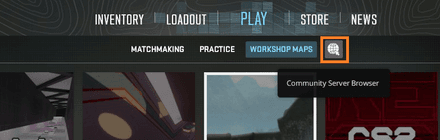
Type
kzorclimbinto the search field with “Map” info, and the game will list available servers.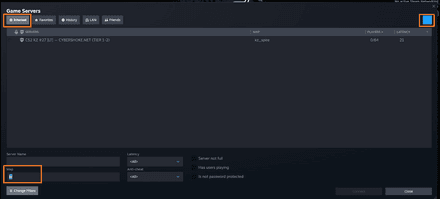
- Join one or more CS2 parkour maps featuring checkpoints and time challenges.


Climb Movement Tips & Common Mistakes
Mastering KZ climbing maps requires a good grasp of how CS2’s physics handle acceleration, strafing, and jumps. Here’s how to improve your movement efficiency and avoid common beginner errors.
Core KZ Movement Techniques and Tips
- Strafing. Release the W key in mid-air and use A/D + mouse movement to maintain velocity. Despite holding W seems logical, it slows you down, disrupts CS2 air strafe control, and shortens your jumps.
- Air Acceleration. Keep your crosshair aligned with your movement and turn with your mouse. Practice syncing the key-press timing of A/D buttons with smooth mouse turns for a faster and more precise movement.
- Crouch-Jumps. Combine jump + crouch at the same time to reach higher ledges or tight spaces. A lot of long-distance jumps require crouching at the very end to land on the surface correctly.
- Bunnyhops (Bhop). This technique of continuous jumps grants small speed bursts. Alongside KZ jump techniques in CS2, bunnyhops also allow you to feel jumping timings better and can be used in the competitive games to pass a few obstacles in a row faster.
- Speed Tracking. Advanced players are sometimes very attentive to every number and can even track their velocity. To see it, use the
cl_showpos 1console command, and don’t forget to use it after activatingsv_cheats 1.

Common Mistakes to Avoid
- Overjumping platforms due to excessive mouse movement.
- Forgetting to release W during air strafes.
- Using overly high sensitivity, which reduces precision.
- Ignoring momentum and air control mechanics.
Conclusion
If you want to refine your movement and mechanical control in Counter-Strike 2, KZ jump training maps are your perfect ally. They reward precision, patience, consistency, and the desire to improve, offering endless replayability and satisfaction when you finally hit that perfect jump. Also, our KZ guide for CS2 includes advice to mix climbing, surfing, and bhop workshop maps to develop a full movement skill set.
To make it even more fun, invite your friends to the KZ movement challenges, using either global or private servers. Of course, the KZ leaderboard in CS2 may not rival your FACEIT or Premier rank, but it's still something worth showing off.
FAQ
KZ stands for Kreedz Climbing, a classic Counter-Strike mod focused on parkour and movement challenges.
Yes, there are many CS2 practice server options, which include timers, ranks, and leaderboards that track the best completion times.
KZ maps emphasize precise jumping and vertical climbing, while surf maps focus on sliding along ramps and controlling air momentum.
kz_sunstone, kz_key, and kz_grotto are among the most suitable starting points for newcomers, offering simple layouts with excellent KZ practice CS2 options, ideal for learning the basics.